Case Study

Workalat

Workalat

A platform that connects clients with professionals

A platform that connects clients with professionals

Role

Lead UX/UI Designer

Duration

3 months

Platform

Web & Mobile

Year

2026
  1. OVERVIEW

  1. OVERVIEW

A platform built for everyone that worked for no one.

A platform built for everyone that worked for no one.

A platform built for everyone that worked for no one.

Workalat is a UK-based professional services marketplace connecting clients who need skilled work done with independent professionals ready to deliver it. At its core it's a two-sided platform two very different users with two very different mental models, sharing one product.


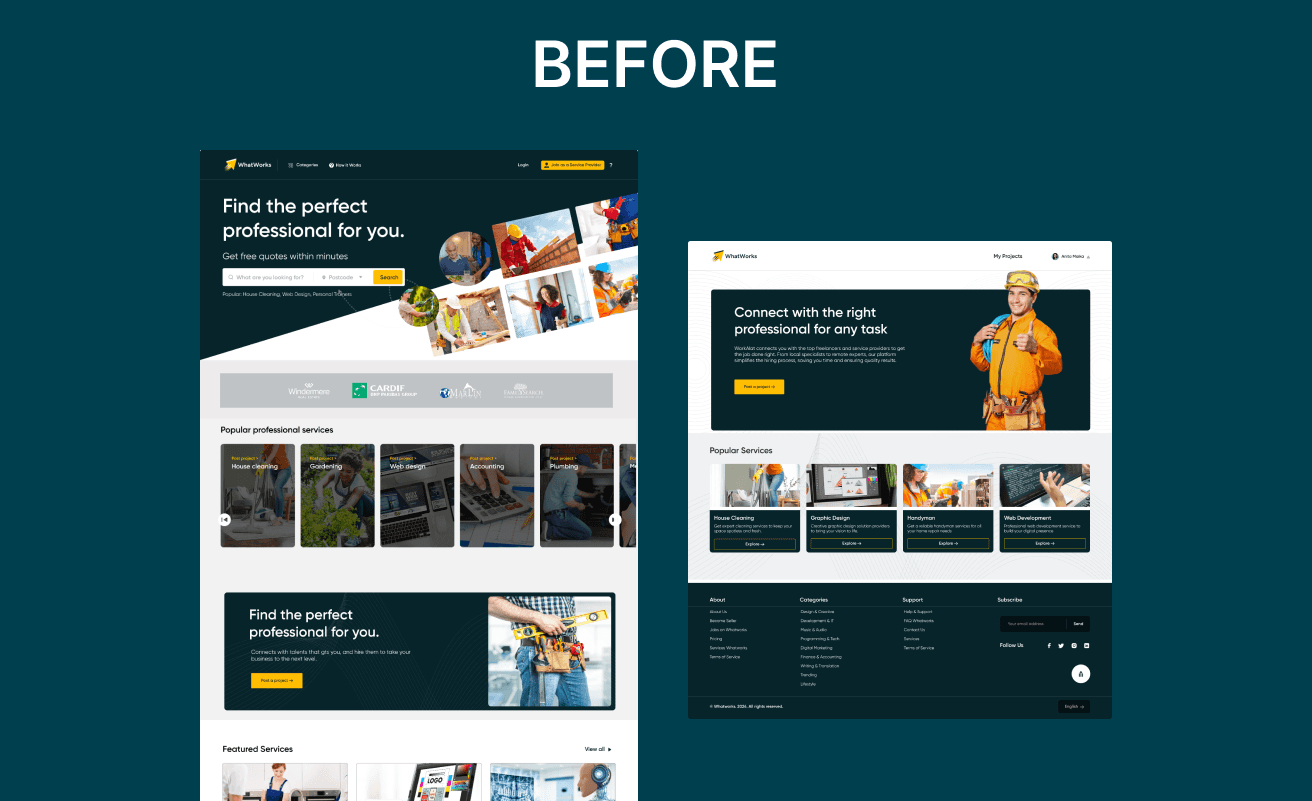
The original platform treated both audiences as interchangeable. Navigation, onboarding, and the core task flows were identical which meant neither side felt the product was built for them. Discovery metrics and conversion rates reflected this confusion.

The redesign set out to create a single coherent system that could still feel native to each user type without forking the codebase or building two separate products. The answer was a shared design language with differentiated entry points, dashboards, and job flows.

Workalat is a UK-based professional services marketplace connecting clients who need skilled work done with independent professionals ready to deliver it. At its core it's a two-sided platform two very different users with two very different mental models, sharing one product.


The original platform treated both audiences as interchangeable. Navigation, onboarding, and the core task flows were identical which meant neither side felt the product was built for them. Discovery metrics and conversion rates reflected this confusion.

The redesign set out to create a single coherent system that could still feel native to each user type without forking the codebase or building two separate products. The answer was a shared design language with differentiated entry points, dashboards, and job flows.

  1. THE PROBLEM

  1. THE PROBLEM

One product, two broken journeys

One product, two broken journeys

The fundamental UX failure was treating a client posting a job and a professional applying to one as the same user doing the same task. They're not. Their goals, anxieties, and success metrics are entirely different.


Clients needed trust signals, comparison tools, and control. Professionals needed discoverability, credibility features, and a clean application flow. The existing design gave both a generic dashboard with generic labels.


The result: clients couldn't easily shortlist candidates, and professionals had no way to stand out. Both groups were experiencing the other's friction as their own.

The fundamental UX failure was treating a client posting a job and a professional applying to one as the same user doing the same task. They're not. Their goals, anxieties, and success metrics are entirely different.


Clients needed trust signals, comparison tools, and control. Professionals needed discoverability, credibility features, and a clean application flow. The existing design gave both a generic dashboard with generic labels.


The result: clients couldn't easily shortlist candidates, and professionals had no way to stand out. Both groups were experiencing the other's friction as their own.

  1. THE AUDIT

  1. THE AUDIT

What the existing design got wrong.

What the existing design got wrong.

What the existing design got wrong.

01

No role-based routing

No role-based routing

Both user types landed on identical pages post-login. There was no mechanism to detect intent and route accordingly, leaving users to self-navigate to tasks that should have been surfaced immediately.

01

No role-based routing

Both user types landed on identical pages post-login. There was no mechanism to detect intent and route accordingly, leaving users to self-navigate to tasks that should have been surfaced immediately.

02

Weak onboarding signal

Weak onboarding signal

Registration collected basic info but never established user type in a meaningful way. The platform had no data to personalise the first session, so everyone got the same empty-state experience.

02

Weak onboarding signal

Registration collected basic info but never established user type in a meaningful way. The platform had no data to personalise the first session, so everyone got the same empty-state experience.

03

Trust deficit for clients

Trust deficit for clients

Professional profiles lacked structured credibility markers no verified badges, no rating breakdowns, no portfolio previews in context. Clients couldn't make informed decisions without leaving the platform.

03

Trust deficit for clients

Professional profiles lacked structured credibility markers no verified badges, no rating breakdowns, no portfolio previews in context. Clients couldn't make informed decisions without leaving the platform.

04

Desktop-first, mobile ignored

Desktop-first, mobile ignored

No mobile app existed. A marketplace where professionals browse jobs and clients post work on mobile had zero mobile presence.

04

Desktop-first, mobile ignored

No mobile app existed. A marketplace where professionals browse jobs and clients post work on mobile had zero mobile presence.

05

No post-hire continuity

No post-hire continuity

Once a professional was hired, the platform offered no tools for file sharing if need be, or communication. Users immediately moved to WhatsApp or email, breaking the engagement loop entirely.

05

No post-hire continuity

Once a professional was hired, the platform offered no tools for file sharing if need be, or communication. Users immediately moved to WhatsApp or email, breaking the engagement loop entirely.

06

No admin operational view

No admin operational view

The internal team had no structured tool for monitoring leads, managing users, or tracking platform health efficiently.


06

No admin operational view

The internal team had no structured tool for monitoring leads, managing users, or tracking platform health efficiently.


  1. DESIGN DECISIONS

  1. DESIGN DECISIONS

Every decision had a reason.

Every decision had a reason.

Decision 01

Split the hero into two explicit user paths

Split the hero into two explicit user paths

Rather than one generic CTA, the redesigned homepage opens with two parallel calls to action: "Find Professionals" and "Browse Jobs." From that point, the journey is entirely the user's own.

Rather than one generic CTA, the redesigned homepage opens with two parallel calls to action: "Find Professionals" and "Browse Jobs." From that point, the journey is entirely the user's own.

Why: Users were dropping off at the homepage because they couldn't self-identify within 3 seconds. Splitting the entry point removes that ambiguity completely.

Decision 02

Design three separate dashboard experiences

Design three separate dashboard experiences

Design three separate dashboard experiences

Clients, professionals, and admins each get a dashboard built around what they actually do, not a generic view with role-filtered content bolted on.

Clients, professionals, and admins each get a dashboard built around what they actually do, not a generic view with role-filtered content bolted on.

Why: A flat shared dashboard forces every user to do cognitive work upfront. Role-specific dashboards surface the right actions with zero hunting.

Decision 03

Build the mobile app from touch up, not desktop down

Build the mobile app from touch up, not desktop down

Every mobile screen was rethought for how people actually use their phones thumb-friendly navigation, simplified flows, only the most critical actions surfaced at any moment.

Every mobile screen was rethought for how people actually use their phones thumb-friendly navigation, simplified flows, only the most critical actions surfaced at any moment.

Why: Shrinking desktop to mobile loses context and creates friction. Professionals browsing jobs on their phone need a completely different flow than a client managing a project on desktop.

Decision 04

Maintain one shared design system across all surfaces

Maintain one shared design system across all surfaces

Despite three separate experiences, one unified component library and design system ensured every surface felt like it belonged to the same product.

Despite three separate experiences, one unified component library and design system ensured every surface felt like it belonged to the same product.

Why: Visual inconsistency breaks trust. When a user moves between web and mobile, the product should feel seamless same colour system, same typography, same language.

  1. THE SOLUTION

  1. THE SOLUTION

Three surfaces. One coherent product.

Three surfaces. One coherent product.

Three surfaces. One coherent product.

Public Website

Public Website

The homepage now routes each user type from the first second. Two CTAs, two journeys, zero ambiguity. Trust signals, ratings, verified profiles, recent activity are surfaced before a user has to search for them.

Dashboard

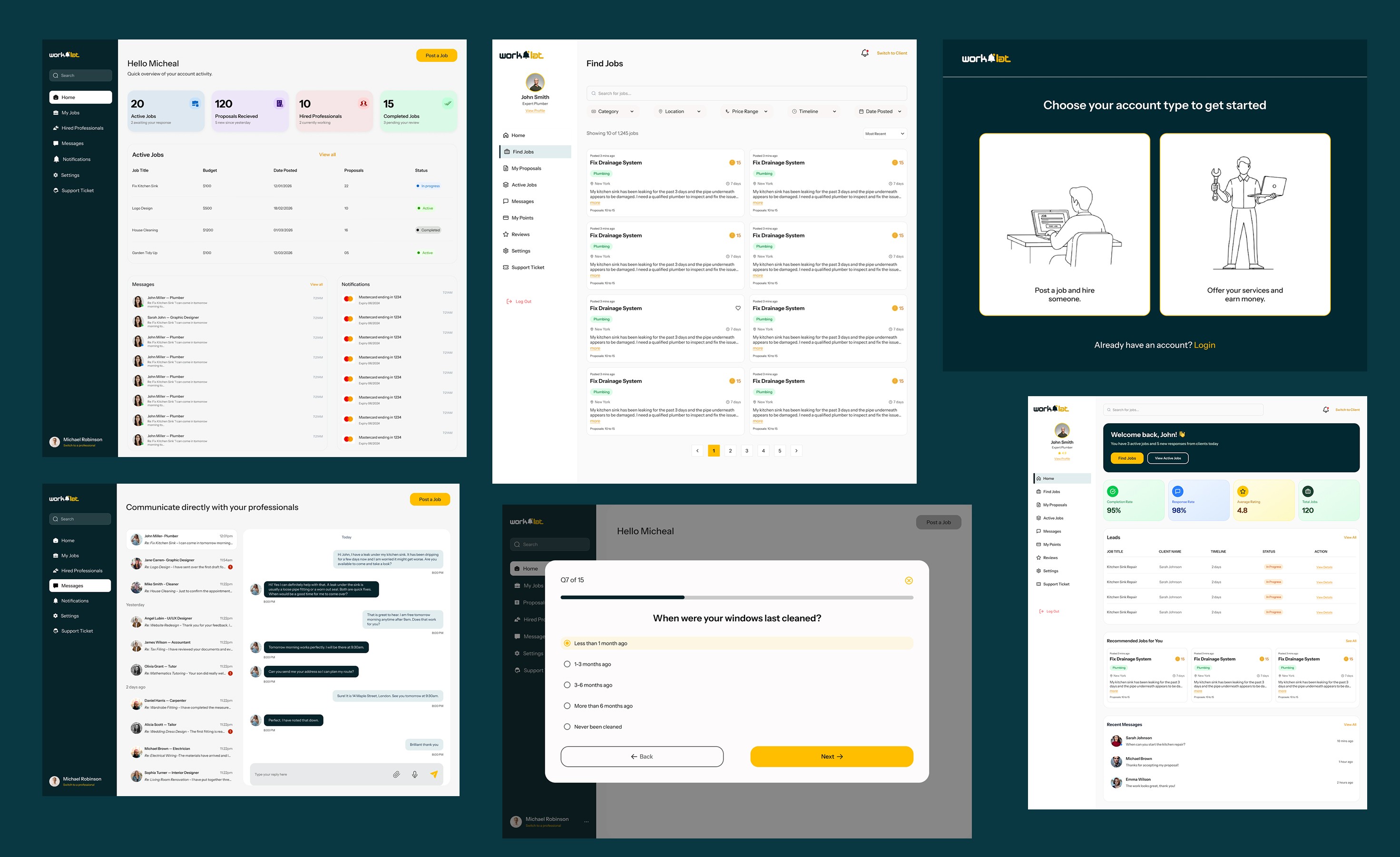
The dashboard was the retention layer where registered users actually live. I designed three separate dashboard experiences:


  • Clients — built around posting jobs, reviewing proposals, and tracking active projects without friction

  • Professionals — centred on finding work, submitting proposals, monitoring earnings, and building reputation

  • Admins — a structured operations view with dedicated modules for leads, user management, and response tracking
Mobile App

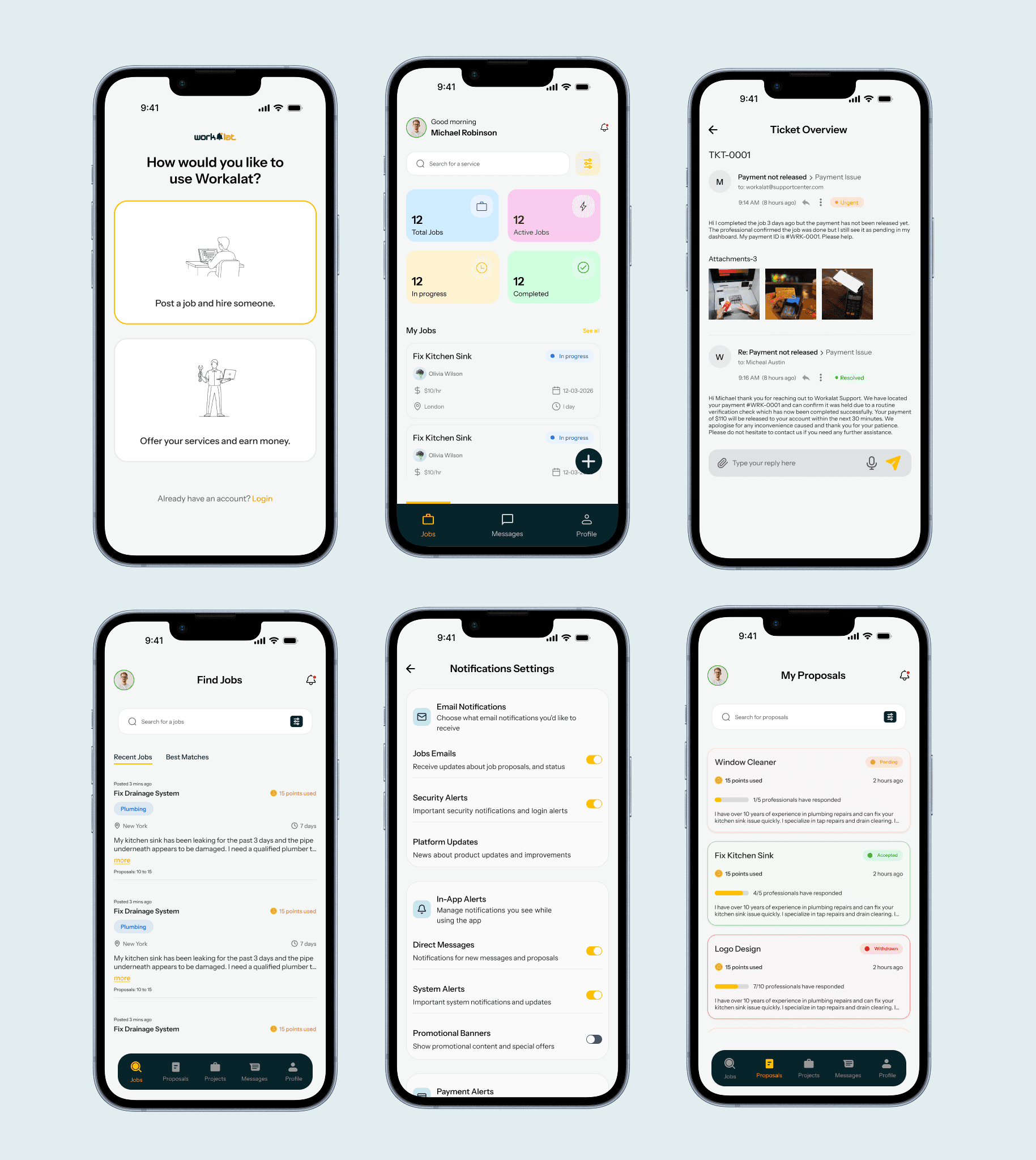
The mobile app was designed from scratch for both clients and professionals not shrunk from desktop, but rethought for touch. Every screen was rebuilt around how people actually use their phones: thumb-friendly navigation, simplified flows, and only the most critical actions surfaced at any given moment.


For clients, the app covers discovering professionals, posting jobs, and tracking active projects. For professionals, it puts earning opportunities, proposal submissions, and payment tracking directly in their pocket.

Despite being a completely separate surface, the app maintains full visual consistency with the web platform same color system, same typography, same component language so the product feels seamless across every device.
What was delivered.

100+

Pages & Screens

3

User Types

Launched

The original platform tried to serve everyone and ended up serving no one. The redesign gave each user type their own journey, restructured the dashboard around what actually matters, and added a mobile app from scratch. The platform now has the structure to do what it was always supposed to connect the right clients with the right professionals, without friction.

Let's Create Something Amazing

Let's Create Something Amazing

I'm currently available for freelance projects and full-time opportunities. Let's discuss how I can help bring your vision to life.

I'm currently available for freelance projects and full-time opportunities. Let's discuss how I can help bring your vision to life.

© 2026 Promise Joseph. All rights reserved.

© 2026 Promise Joseph. All rights reserved.

Create a free website with Framer, the website builder loved by startups, designers and agencies.